We need to secure and segment our network and block direct connections to server networks.
There’s also a lot of buzz about Zero Trust Network Access (ZTNA) and the “old” castle and moat defense is considered weak and ancient. Products are often presented as a ZTNA solution even that it’s more of a concept than anything else. This was discussed in our earlier posts Security basics, part 2 – Who? and Security basics, part 3 – Where?.
We just handled some example cases in our previous post NetScaler as IdP/SP – why?, but left out one example that is gaining more traction day by day. This post handles one possibility to close in with ZTNA and raise the security of your environment.
What this really drills down to, is to leverage the new licensing model (discussed in Citrix Licensing changes for NetScaler) and either use an existing NetScaler deployment or create a new one to establish a Gateway, that is reachable from only the internal networks or “Tier 2” in some terms. In my mind it means that you have an authenticated connection to the corporate network in place which depends on your environment.
- Traditional VPN connection to internal network
- Trusted / office networks
Topology
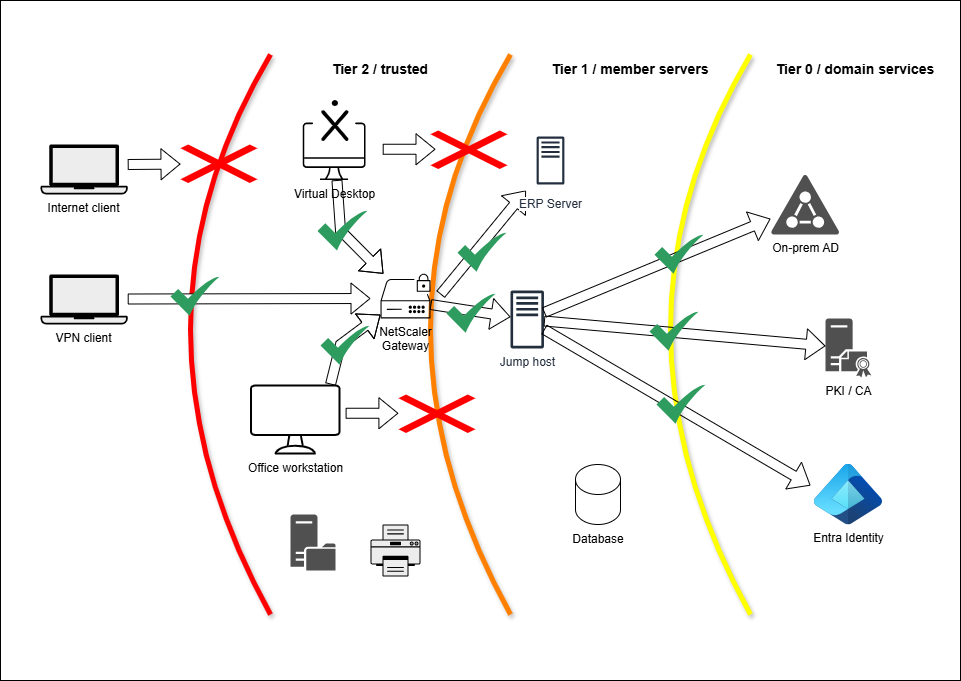
This is what it could look like network topology-wise:
| Source | Destination | User | Access |
|---|---|---|---|
| Internet client | Tier 2 / trusted * Bastion * Office printers, file services Tier 1 & Tier 0 | Tier 2 |  |
| VPN client Office workstation Virtual Desktop | Tier 2 / trusted * Bastion * Office printers, file services | Tier 2 |  |
| VPN client Office workstation Virtual Desktop | Tier 1 / member servers Tier 0 / domain services | Tier 2 Tier 1 | |
| VPN client Office workstation Virtual Desktop via bastion | Tier 1 / member servers | Tier 1 | |
| VPN client Office workstation Virtual Desktop via bastion | Tier 0 / domain services | Tier 1 Tier 0 | |
| VPN client Office workstation Virtual Desktop via bastion & tier 1 management | Tier 0 / domain services | Tier 1 Tier 0 | |
I have used the Microsoft Legacy Tier model just as an example. Just place the resources in your Tier design like ILO/LOM interfaces, firewall management, NetScaler management interfaces, Hypervisor management, etc… in the diagram.
The internal NetScaler Gateway in the picture can be configured to work as RDP/HDX/Web proxy depending of your environment.
With authentication I’d consider the following:
- Audit trail (SSO of some-sort)
- If the user authenticates using their Tier 1 Admin account, should that identity follow through to the destination?
- Some web applications or non-domain-member servers might have local authentication, how should these be handled?
- Authentication requirements (MFA)
- User account level to be used for authentication
- Use Tier 1 Admin account for authentication?
- Use NetScaler nFactor capabilities to first authenticate using Tier 2 basic user account followed by Tier 1 Admin (mapped/enforced user) account?
Other things to consider
Network segmentation – We’ve pretty much anything from flat network topologies to microsegmented networks. Bear in mind that if all your servers are in one big network the goal might be to create subnets for each purpose or even start micro segmenting the network.
This might be quite the project, so instead you might want to apply a client firewall policy that restricts RDP connections from the Tier 1 / office networks to the servers and enforce the connections via the internal NetScaler Gateway (or a jump host / bastion which can be accessed via the internal NetScaler Gateway.
User account privilege levels – As with the network topologies, we’ve seen environments where user logs in with a domain admin account to a VPN or their workstation, but more often (fortunately) users tend to have a separate admin-account for managing the services. We’ve discussed about the user account “levels” in Security basics, part 2 – Who?.
Complex environments – Many environments have more than one AD domain or even forest, that might present a challenge. Consider creating separate Gateway instances or an nFactor solution to cover these cases. Most importantly; proper assessment of the environment is a key to succes.
Log – Don’t forget audit logging (see Security basics, part 4 – When?)!
What next?
The reason why I wrote this post is that we’ve set up several environments and clearly our customers have expressed interest in the solution.
Feel free to use the concept to your benefit, but if you need any assistance, don’t hesitate to drop a note at kari.ruissalo@comping.fi.